Documentation
Private Preview
Autopilot Monitor is currently in Private Preview. The service is available to a limited number of organizations while the core functionality is being refined and stabilized. Access is invite-only and managed manually on a per-tenant basis.
Expect instability during Private Preview
- •Things can and will break. The backend, web frontend, and agent are all under active development and receive frequent updates.
- •Availability is not guaranteed. Deployments and maintenance may cause downtime without prior notice.
- •Features, APIs, and data structures may change at any time. Existing session data may be cleared between major updates.
This preview is intended for testing and feedback — not for production use in critical environments.
How to request access
To get started, sign in with your Microsoft Entra ID account on the Autopilot Monitor portal. If your organization has not yet been granted access, you will see a Private Preview screen (see below) confirming that your tenant has been placed on the waitlist. Once you are on the waitlist, reach out via LinkedIn or open a GitHub issue to request activation — your tenant is then enabled manually in the backend. I'll check incoming requests regularly and approve them as quickly as possible, depending on my capacity. When you signed-up, sign in again later to view the updated approval status on your dashboard.
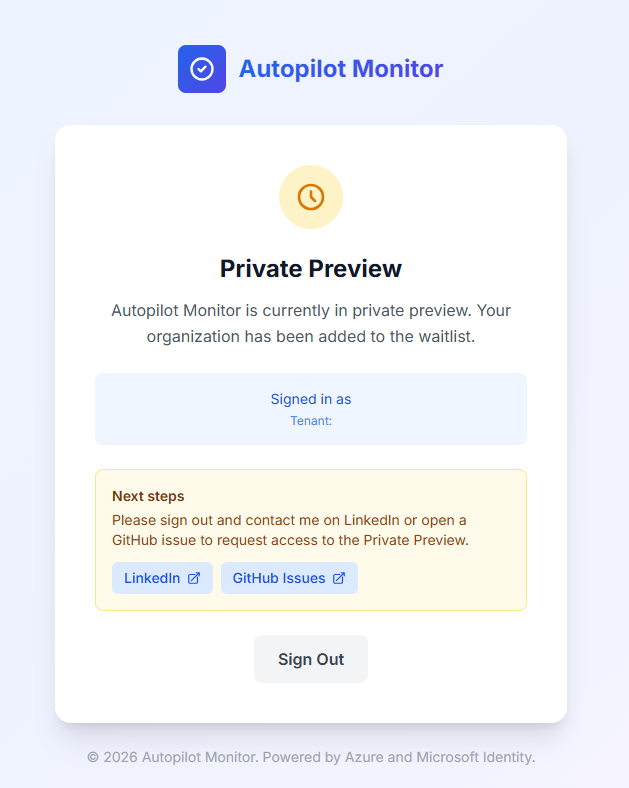
The Private Preview screen you will see when your tenant is on the waitlist.
After your tenant is approved
Once access is granted, you can sign back in and will be taken directly to the portal. Continue with the Setup and Agent Setup sections of this documentation to get your first Autopilot enrollment sessions flowing in.